Azure Sentinel 1. Lab + ChatGPT - 11/16/2025 update
- Michael He
- Oct 4, 2025
- 6 min read
Updated: Nov 6, 2025

Sentinel Lab Setup
ChatGPT Preparation & OpenAI Playground (API gathering)
Sentinel Incident & ChatGPT Integration via Logic App
Sentinel Lab Setup
Sentinel All In One Github:
https://github.com/Azure/Azure-Sentinel/tree/master/Tools/Sentinel-All-In-One
Click "Deploy to Azure". You will need an Azure account and define Resource Group, LogAnalytics Work Space names and so on
Please make sure you select ALL options for the deployment
You will also need to grant permission for running the playbook for your resource group

Option (Enabling UEBA feature):

This will save you a lot of time & effort vs. configure everything from scratch
Resource Group:

Defender Portal Incidents (Azure separated Sentinel to Defender Portal now):

Click one of the incidents to see details. Take a note here because we are going to compare this with what after ChatGPT's integration!

Create a Logic App and assign appropriate role assignment to it
Choose "Consumption" option
Check "Enable log analytics"

Even though you are the owner, you still need assign appropriate role to the logic app. I assigned "Sentinel Responder" to the resource group.
You need to perform this step for every playbook / logic app!!
ChatGPT Preparation & OpenAI Playground
API key: https://openai.com/
Register an account
It requires a $5 deposit
Create an API key, document it because once you move away from this page the key will be hashed

OpenAI Playground https://platform.openai.com/chat/edit?models=gpt-4o

let's change the API to "Chat Completions"

I am using gpt-4o here for demo
Temperature: 0.7 to narrow the outputs randomness. i.e. there are 10 different flavored ice creams, and I need to narrow the randomness of output flavors.
Top P: 0.5 controls size of the allowed choice pool. i.e. there are 10 different flavored ice creams, now based on my budget, I am narrowing the possible choices from 10 different to say 6 now.
Max tokens: 8000 so it won't cut off the outputs
Frequency Penalty: reduce the repetition of specific words or tokens based on its count
Presence Penalty: reduce the repetition of specific words or tokens based on its existence

System message: defines how the model should behave. Sets the overarching rules, persona, and context for the LLM.
i.e. "You are a cyber security analyst and I need you to evaluate current incident. You will recommend a systematic approach for the incident analyst to validate the legitimacy of the reported incident, emphasizing key indicators that may confirm or disprove its authenticity. Detailed information about the incident will be provided in the next prompt."
User message: drives the current turn of the conversation. Presents the immediate question, task, or input from the human user.
i.e. "Please write a function to calculate the factorial of a number"
Assistant message: serves as the models' memory of what it has already said. Represents the LLM's own prior responses.
i.e. few shots
Let's test an IP address with possible proposed outputs
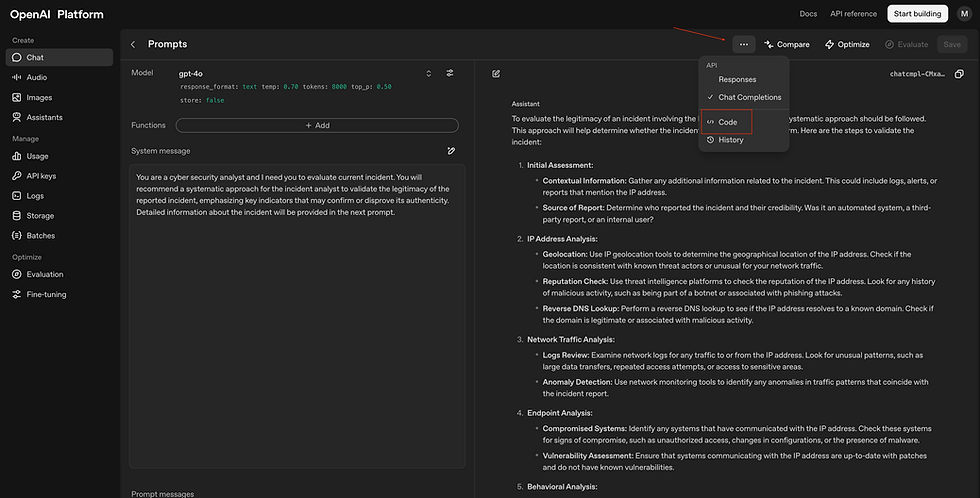

Now let's get the API details, use curl. Later, we will use this to craft the Logic App in Azure
Logic App Configuration

Use "Microsoft Sentinel incident" as trigger under "Logic app designer"
Define variables


Note, those information can be found from OpenAI Playground > Code > "curl" from previous step


I left the value empty so I can fill in later after the actual API call
API Call
Pay attention to the [] and {} beginning and ending -

Use previously defined variables to fill i.e. URI, API Key, and so on
Body: copy from OpenAI Playground > Code > curl.

Modify the code, i.e. replace content > text > with system prompt variable; replace user content > text > with user prompt variable
Now, let's run the playbook / logic app in Sentinel - before running playbook, remember to save the playbook first.
Go to Defender Portal, pick an incident, then run playbook


Go back to Azure portal, Logic App > Overview > Run History > click the job > click "HTTP-Call ChatGPT"

Under the "Outputs" section > click copy (we are going to use this in the next step for JSON's schema)

Parse JSON

We need to define a schema here, click "Use sample payload to generate schema"
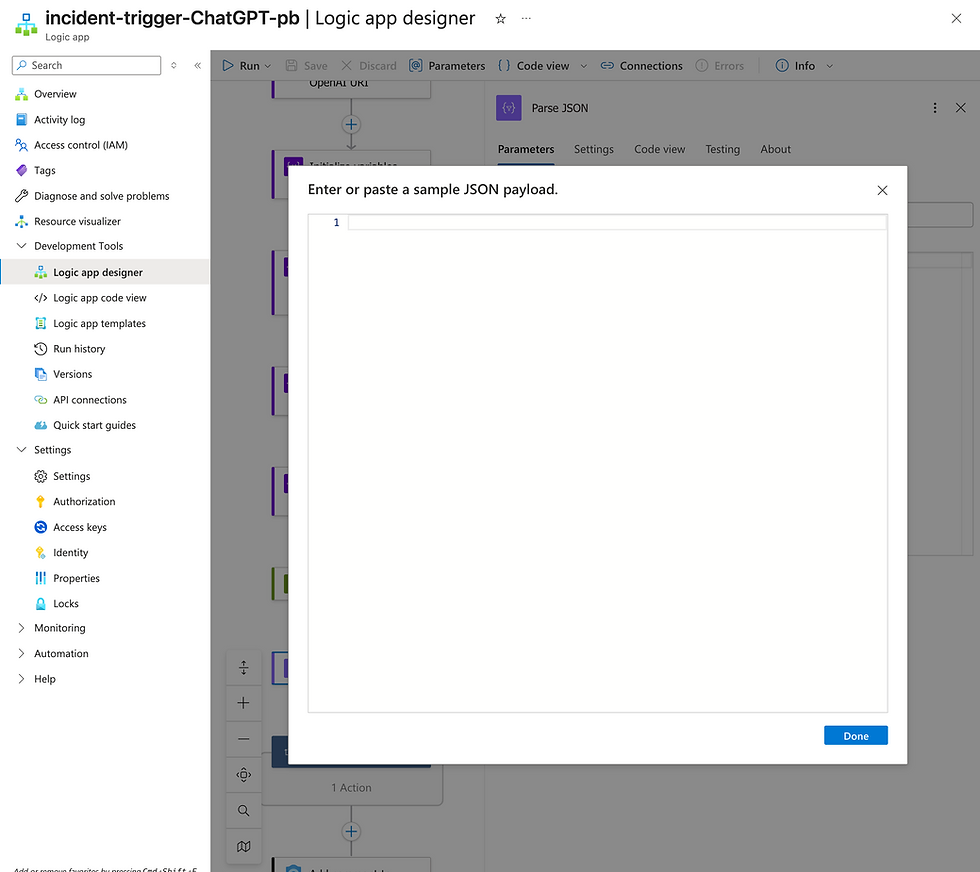
Now, go back to the previous step, paste the outputs here
Create a set variable and add comments to the incident


Now, save and go back to incident and run playbook

example:
This message was created by ChatGPT and contains recommendations for the incident.


Based on the incident titled **"Solorigate Network Beacon"**, and the associated entities:

- **IP Address**: `17.81.146.1`
- **Domain Name**: `avsvmcloud.com`

This incident appears to be related to **Solorigate (a.k.a. SUNBURST)** — a high-profile supply chain attack involving the compromise of SolarWinds Orion software. The domain `avsvmcloud.com` is a known **command-and-control (C2)** domain used in the early stages of the SUNBURST malware campaign.

---

### **Objective**
To validate the legitimacy of this incident and determine whether it represents a true positive (actual compromise) or a false positive (benign activity).

---

## ✅ **Recommended Systematic Approach for Incident Validation**

### **1. Confirm Threat Intelligence Indicators**
- **Domain `avsvmcloud.com`** is a **confirmed malicious domain** associated with SUNBURST malware.
- **IP `17.81.146.1`** should be checked against threat intelligence feeds (e.g., VirusTotal, Recorded Future, MISP, Microsoft Threat Intelligence) to confirm if it is associated with known malicious infrastructure.

**Action:**
- Query threat intelligence platforms for both the domain and IP.
- Cross-reference with known SUNBURST IoCs (Indicators of Compromise) from trusted sources like CISA, Microsoft, FireEye (now Mandiant), and others.

---

### **2. Review DNS Resolution Logs**
- Investigate whether internal hosts resolved `avsvmcloud.com`.
- Determine the **timestamp**, **source IP**, and **hostnames** that made the DNS request.

**Key Indicators:**
- DNS queries to `avsvmcloud.com` from internal systems.
- Repeated or timed queries may indicate beaconing behavior.

**Action:**
- Use your SIEM (e.g., Microsoft Sentinel) to query DNS logs:
```kusto
SecurityEvent
| where EventID == 22 or EventID == 23
| where DestinationDnsDomain == "avsvmcloud.com"
```

---

### **3. Analyze Network Traffic**
- Look for outbound connections to `17.81.146.1` or other known SUNBURST C2 IPs.
- Check for unusual traffic patterns (e.g., beaconing intervals, encrypted payloads, or non-standard ports).

**Action:**
- Review firewall/proxy logs or use network detection tools (e.g., Zeek, Suricata).
- Look for HTTP/S connections to the domain or IP, especially from systems running SolarWinds Orion.

---

### **4. Identify Affected Hosts**
- Correlate DNS and network logs to identify the internal systems that communicated with the malicious domain/IP.
- Prioritize systems running **SolarWinds Orion** or those in critical network segments.

**Action:**
- Create a list of potentially compromised hosts.
- Use EDR (e.g., Defender for Endpoint, CrowdStrike) to investigate those endpoints.

---

### **5. Endpoint Investigation**
- Examine endpoints that contacted the malicious domain/IP for signs of compromise:
- Suspicious processes (e.g., `SolarWinds.BusinessLayerHost.exe`)
- Unusual scheduled tasks or registry changes
- Presence of SUNBURST-related DLLs (e.g., `SolarWinds.Orion.Core.BusinessLayer.dll`)

**Action:**
- Run forensic scans on affected systems.
- Use EDR tools to search for SUNBURST malware artifacts.

---

### **6. Cross-Check with SolarWinds Orion Deployment**
- Confirm whether your organization was using a vulnerable version of SolarWinds Orion during the SUNBURST campaign (March–December 2020).

**Action:**
- Check software inventory and patch management systems.
- Validate whether Orion software was installed and if it was updated/patched.

---

### **7. Assess for Secondary Activity**
- SUNBURST was often a precursor to more advanced post-exploitation activity (e.g., lateral movement, credential theft).
- Look for:
- Use of compromised accounts
- Lateral movement via WMI, PsExec, or RDP
- Unusual Kerberos ticket activity (e.g., Golden Ticket)

**Action:**
- Perform a threat hunt for known SUNBURST follow-on behaviors.
- Check for anomalous logins, privilege escalation, or domain controller access.

---

### **8. Determine Incident Scope and Severity**
- If indicators confirm malicious activity, assess:
- Number of affected systems
- Data exfiltration risk
- Lateral movement
- Privileged account compromise

**Action:**
- Engage incident response team.
- Consider containment, eradication, and recovery steps.

---

## 🧩 **Key Indicators to Confirm or Disprove Authenticity**

| Indicator | Confirms Authenticity | Disproves Authenticity |
|----------|------------------------|-------------------------|
| DNS resolution to `avsvmcloud.com` | ✅ | ❌ |
| Outbound connection to `17.81.146.1` | ✅ | ❌ |
| Host running vulnerable SolarWinds Orion | ✅ | ❌ |
| Presence of SUNBURST DLL or process | ✅ | ❌ |
| Threat intel match for domain/IP | ✅ | ❌ |
| No internal host activity to IoCs | ❌ | ✅ |
| Domain/IP used by legitimate service | ❌ | ✅ (unlikely in this case) |

---

## 📌 Final Recommendations

1. **Treat this incident as HIGH PRIORITY** due to its association with a known nation-state campaign.
2. **Immediately isolate any systems** that have communicated with `avsvmcloud.com` or `17.81.146.1`.
3. **Perform deep forensic analysis** on affected systems.
4. **Engage with Microsoft and/or third-party IR teams** if internal capabilities are limited.
5. **Report the incident** to appropriate regulatory or government bodies if required (e.g., CISA, NCSC).


Comments